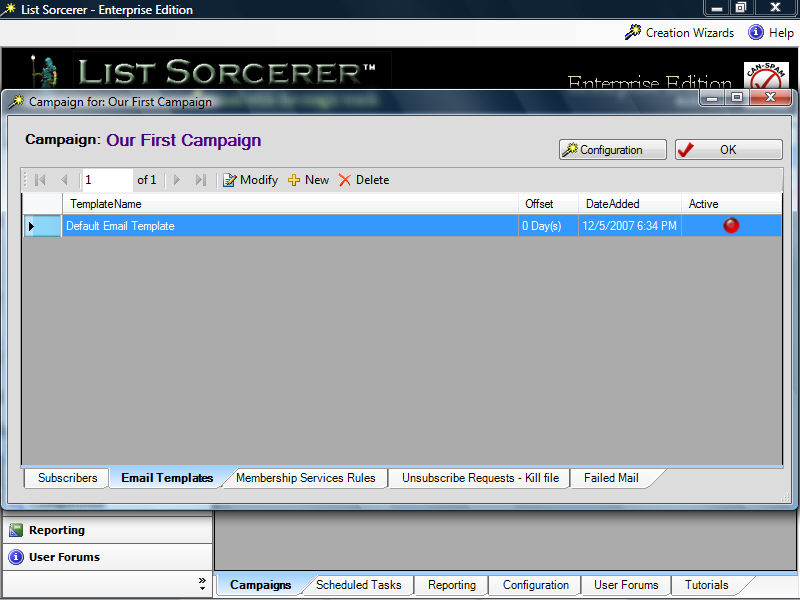
You will be presented with a list of e-mail templates upon selecting the e-mail templates tab from within your campaign. You may also create a new e-mail template or delete an existing one by selecting the appropriate item from the tool bar above. The selected template may be modified at anytime by either selecting the "Modify" item from the tool bar or by simply double-clicking on it.
E-mail templates when created contain default values for most of the fields. These default values should be changed in order to meet the criteria of your campaign. The figure below is typical of what a newly created e-mail template might look like. E-mail templates include support for both HTML and Text messages and incorporate a "Message Preview", and "Send Test Message" allowing you to view in real-time how your message will appear to others. Full support for timed e-mails can be easily accomplished through the use of the e-mail templates "Offset within Campaign Cycle" field, in conjunction with the "Comparison Date Field for Offset" by default the list sorcerer e-mail marketing program times e-mail delivery offsets from the date the recipient subscribed. However in some instances you may require the offset of email delivered to be measured from a different point. For example lets pretend that you sell steel widgets, and you would like a timed sequence of e-mails to begin from the time your customer received the widget and not from the time that they subscribed or became your customer. By changing the "Comparison Date Field for Offset" this could be easily accomplished. Through the use of this field and various offsets you can easily have list sorcerer managing multiple timed email sequence all being based upon different fascists of your business.
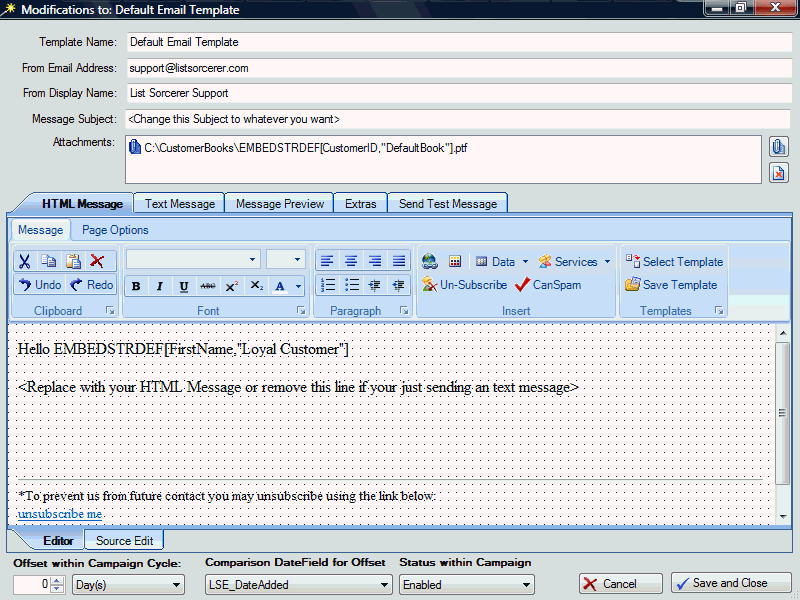
The activities that may be performed using e-mail templates tool bar are as follows:
HTML formatting - full support for HTML editing using either our WYSIWYG editor and/or direct source code edit.
Data - every field within your campaign may be used and easily embed into the content of your outgoing e-mail template by selecting the appropriate field from the drop down data menu. You may also embed this dynamic data within the "Message Subject", "From Email Address", and "Attachments" data fields of your email template.
Unsubscribe - inserts generic text with a link for your members to unsubscribe.
Services - unsubscribe links, member verification links, and links for new subscriptions can all be inserted within your document using this button.
Can-Spam - inserts a copy of the can-spam compliant text configured within your campaign.
Select Templates - opens a list of e-mail template sets including a preview that you may select from and import into your active e-mail template.
Save Templates - allows you to save the contents of the current e-mail template to the templates repository.
Within the Extras Tab you will find the ability to not only change x-headers but also the ability to place validity constraints on your e-mail template. Using validity constraints you will be able to easily time the duration of a selected e-mail template within your campaign, thereby easily giving you the ability to setup several monthly specials etc. and then constraining each of the monthly e-mail templates to the desired month. In addition we have also just recently supplied hen integration of an Expression Interpreter that will now allow an expression returning either TRUE or FALSE to be assigned to any email template. Expressions are run dynamically at runtime and will prevent an email template from being used should its expression upon evaluation return FALSE.